Tampilkan postingan dengan label Tools Windows. Tampilkan semua postingan

Selasa, 12 Maret 2013

Cara Menghilang Tulisan Windows7 Not Genuine Tanpa Software

| |
0 komentar
Banyak pengguna Windows 7 mengalami pesan error "Windows 7 is not genuine" dalam bahasa Indonesianya bahwa Windows 7 tidak asli​​. Masalahnya bahwa Windows7 yang terpasang dan terinstall pada PC Desktop ataupun Notebook bukan Windows7 original alias Windows7 bajakan. Banyak tools yang bisa digunakan untuk menghilangkan tulisan windows7 not genuine atau membuat windows-7 bajakan menjadi asli atau windows7 genuine. Bisa dengan software windows7 loader atau tools lainnya.
cara membuat windows7 bajakan menjadi asli tanpa software
Berhubung admin pernah memposting artikel komplet dengan tools membuat windows7 bajakan menjadi asli, dan mendapat komplain dmca dari microsoft maka kali ini admin membuat cara yang lebih mudah, yaitu cara menghilangkan tulisan windows 7 not genuine tanpa software hanya dengan trik ringan yaitu berupa perintah sederhana melalui commanf prompt windows7 itu sendiri .

Caranya cukup mudah dan bisa dilakukan sendiri ketika sobat mengalami hal serupa.
pertama klik start ---> lalu pilih RUN ---> lalu ketik CMD ---> atau tekan tombol windows + R
Usahakan dalam mode run administrator ( atau tekan F8 ---> lalu pilih Safe mode pada keyboard pada waktu booting awal windows )  Ini gambarnya :


ketik cmd

Pada posisi layar berjalan pada menu command prompt  seperti gambar diatas, lalu sobat ketikan perintah berikut : SLMGR -REARM lalu enter, tunggu kurang lebih 5 sd 10. Nanti akan keluar pesan begini yang menandakan proses berhasil.

proses berhasil
Restart atau booting windows 7 sobat, tulisan windows 7 not genuine sudah tidak keluar lagi dikanan bawah layar monitor. Artinya proses berhasil. Demikian tips ringan ini semoga berguna.

Read More

Kamis, 11 Oktober 2012

Download Antivirus Avira Free 2013

| |
0 komentar
avira 2013

Free Download Antivirus Avira 2013, buat sobat yang setia dan percaya dengan antivirus dari avira..!!
sekarang sudah bisa mendownload versi 2013 nya. untuk yang selama ini menggunakan yang free fitur 2013 ini tinggal mengupgrade versi sebelumnya avira 2012. Files ukuran 97 MB. dapat langsung di klik pada link download diatas atau klik  Disini

Sumber : www.avira.com
Read More

Cara Buat File PDF Dengan PdfCreator

| |
0 komentar
Yang ini sering banyak ditanyakan teman kantor, bagaimana cara membuat dokumen PDF? mungkin masih banyak yang belum tahu, yang selama ini sering kita gunakan pdf-reader bawaan adobe atau foxit, nah ada beberapa pilihan beberapa software yang dapat digunakan, tetapi PDFCreator buatan pdfforge menawarkan fungsi ini mudah dan praktis. Software ini terakhir diperbarui 4 Juni  2012 itu bahkan gratis.

Cara kerjanya, Anda cukup menyiapkan dokumen yang Anda ingin membuat file PDF. Setelah siap, maka Anda dapat  mengekspornya dengan cara dokumen dicetak melalui perintah Print dalam program yang Anda gunakan, dan kemudian memilih PDFCreator sebagai printer Anda. Lakukan pengaturan sebagai cetak yang diperlukan dan kemudian. Akibatnya, dokumen tersebut tidak akan dicetak pada kertas, melainkan untuk menghasilkan format file PDF baru.


pdfcreator

Selain fungsi dasar untuk membuat PDF, software ini juga menyediakan fitur untuk mengirimkan file PDF yang dihasilkan melalui email, memberikan tanda tangan digital dalam file PDF Anda sebagai penanda Anda adalah Pencipta PDF, serta fasilitas untuk mengenkripsi dokumen PDF untuk tidak dibuka dan dicetak oleh sembarang orang. Program PDF Creator dapat diinstal pada Windows XP, Windows Vista, atau Windows 7. Ukuran file instalasi sekitar 18 MB.

Keuntungan pdfcreator dari pdfforge :
PDFCreator memungkinkan Anda untuk membuat file dokumen PDF langsung dari program apapun yang Anda gunakan, selama ini program menyediakan fitur untuk dokumen dicetak. Software ini gratis, dapat menggantikan program program seperti Adobe PDF (Acrobat) adalah murni komersial.

Kekurangan:
Program antarmuka tidak tersedia memiliki intuitif seperti pada program Windows lainnya. Perhatikan juga font yang Anda gunakan, kemungkinan program ini tidak membuat font dengan benar.

Untuk mencobanya silahkan download :  Disini
Read More

Minggu, 08 Juli 2012

Antivirus Kiamat Internet 9 Juli Atau DNSchanger

| |
0 komentar
9 Juli 2012 ini ramai disebutkan dimedia tentang akan terjadi "kiamat internet" untuk pengguna PC dan Mac yang belum mengambil langkah untuk memastikan sistem mereka tidak  terinfeksi dengan apa yang disebut malware DNSChanger. Koneksi Internet Anda mungkin tidak bekerja hari itu karena jaring pengaman sekarang di tempat dari FBI terhadap malware akan dihapus kemudian, dan jika komputer Anda terinfeksi, Anda tidak akan bisa mendapatkan ke Internet.

FBI menangkap enam warga  negara Estonia yang didakwa dengan menggunakan malware dan DNS server nakal untuk membajak jutaan komputer di seluruh dunia.Saat itu, Trend Micro Feike Hacquebord menyebutnya "takedown cybercriminal terbesar dalam sejarah." Perusahaan ini salah satu  dari beberapa yang bekerja dengan FBI di takedown.

antivirus-dnschanger


Berbagai metode untuk mendapatkan penghasilan dari botnet DNSChanger [adalah] digunakan oleh penjahat, termasuk mengganti iklan di situs Web yang dibuka oleh korban, pembajakan hasil pencarian dan mendorong malware tambahan.

Karena malware ini begitu buruk - itu cukup kuat untuk menghapus software anti-virus komputer - FBI membentuk jaring pengaman menggunakan komputer pemerintah untuk mencegah gangguan Internet manapun untuk pengguna komputer yang mungkin terinfeksi.

Itu jaring pengaman ditetapkan untuk pergi di bulan Februari, tetapi tanggal telah diperpanjang hingga Juli 9 karena lembaga yang bersangkutan yang tidak pengguna cukup menyadari masalah.

Menurut FBI untuk membantu para korban terpengaruh oleh perangkat lunak DNSChanger berbahaya, FBI memperoleh perintah pengadilan  otorisasi Sistem Internet Consortium (ISC) untuk menyebarkan dan mempertahankan sementara server DNS bersih. Solusi ini  bersifat sementara, memberikan waktu tambahan bagi korban untuk membersihkan komputer yang terkena dampak dan mengembalikan  pengaturan normal mereka DNS. DNS bersih server akan dimatikan pada tanggal 9 Juli 2012, dan komputer masih dipengaruhi oleh  DNSChanger mungkin kehilangan konektivitas internet pada saat itu.

Jadi, apa yang perlu Anda lakukan? Pastikan komputer Anda bersih. Anda dapat melakukan yang pertama, dengan mengunjungi website :

http://www.dns-ok.gov.au/
http://www.dns-ok.us/
http://www.dns-ok.de/
http://www.dns-ok.fi/
http://www.dns-ok.ax/
http://www.dns-ok.be/
http://www.dns-ok.fr/
http://www.dns-ok.ca/
http://www.dns-ok.lu/
http://dns-ok.nl/

Website ini referensi dari FBI, DNS-OK, yang akan memberitahu Anda apakah komputer Anda terinfeksi dengan malware DNSChanger. FBI mengatakan bahwa jika Anda melihat hijau, itu bagus. Merah berarti Anda terinfeksi. Namun, catatan biro, beberapa sistem yang tampaknya bersih mungkin tampak seperti itu karena penyedia layanan mereka: "Jika ISP Anda mengarahkan lalu lintas DNS untuk pelanggan, Anda akan mencapai situs ini walaupun anda terinfeksi."

Jadi langkah berikutnya, pasti jika Anda "merah," tetapi bahkan ide yang baik jika Anda "hijau," adalah pergi ke situs ini http://www.dcwg.org/, yang dijalankan oleh Kelompok Kerja DNS Changer. DNS Changer Kelompok Kerja akan mendeteksi apakah komputer Anda telah "melanggar", dan jika demikian, akan mengarahkan Anda untuk memperbaiki yang tepat untuk komputer Anda.

Untuk antivirus DNSChanger nya atau Virus 9 Juli atay July, 9 atau DOOMSday Internet  bisa didownload pada lik download dibawah ini :

DOWNLOAD


Read More

Rabu, 23 Mei 2012

Animated Wallpapers Maker

| |
0 komentar
Bosen dengan tampilan wallpaper desktop windows Xp kamu cuma diem berupa gambar? Ingin menghidupkan tampilan desktop windows menjadi lebih segar, Animated Wallpaper Maker  solusinya, dengan software animasi wallpaper maker ini akan membantu kamu menjadikan  beberapa foto album menjadi static photos animasi sebagai desktop background windows.

Animated Wallpapers maker 

Tidak perlu software khusus cukup dengan software ini dan beberapa kali klik mouse dan  menload  gambar kamu sudah bisa menjadikan desktop backgrund kamu menjadi hidup layaknya  animasi. Animated Wallpapers maker ini juga supports Windows XP, Vista and Windows 7.  Tidak perlu panjang lebar Ingin mencobanya silahkan download pada link download dibawah  postingan ini, ukuran filesnya kecil kok.
Semoga berguna.

Download
Read More

Minggu, 29 April 2012

CCleaner 3.18 Download

| |
0 komentar
CCleaner (Crap Cleaner) 3.18 terbaru 2012  adalah freeware sistem untuk optimasi pada sistem operasi windows. Tools Ini akan menghapus file yang tidak terpakai dari sistem anda memungkinkan Windows untuk berjalan lebih cepat dan membebaskan ruang disk yang berharga keras. Hal ini juga membersihkan jejak aktivitas online Anda seperti sejarah Internet Anda.


Feature :

  •     Added support for Firefox 12 final release.
  •     Added support for Google Chrome 20.0 beta.
  •     Added multi-select to detailed results view.
  •     Improved support for Internet Explorer 64-bit Add-ons.
  •     Improved folder detection algorithm for cleaning items.
  •     Improved scrolling interface for Include/Excluding dialogs.
  •     Improved compatibility with Windows 7 alt-tab functionality.
  •     Improved user interface for Drive Wiper Tool.
  •     Added cleaning for Corel VideoStudio Pro X5, MS Security Client and GIMP 2.8.
  •     Improved cleaning for OpenOffice 3, AIMP 3.
  •     Minor GUI improvements.
  •     Minor bug fixes.
  •     fixed bug in Windows Media Player.
 Download
Read More

Senin, 05 Maret 2012

Cara Aktivasi Windows 7 dengan Windows 7 Loader

| |
0 komentar
Windows 7 loader ini berfungsi untuk menjadikan windows 7 trial menjadi activated atau membuat windows7 trial menjadi full version. Dan bisa menghilangkan alert windows not genuine advantage pada windows 7 yang biasa muncul di pojok kanan bawah layar desktop. Jalankan windows 7 loader maka windows 7 loader akan membaca informasi tentang Operating system anda apapun Notebook/laptop/netbook/pc-desktop anda. Tools ini sudah diuji cobakan pada Notebook Toshiba Satellite L645.

Cara menjalankan windows 7 loader untuk meng Aktivasi windows 7 yang trial versi :


1. Pada saat menginstall windows 7 ultimate ( Bila diminta memasukan serial number windows7 Ultimate)
    biarkan kosong.

2. Jika Windows7 ultimate sudah di install dan lewat 30 hari dari waktu activated trial langusng ke langkah
    Selanjutnya.

3. Download dulu Windows7 Loader dibawah postingan ini.

4. Ekstrak dulu dalam satu folder dan Jalankan Windows 7 Loader.

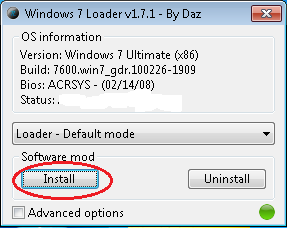
5. Biarkan saja begitu (Default mode) seperti gambar dibawah ini.


windows7-loader

6. Klik Install seperti gamber.

7. Tunggu sebentar hingga muncul kotak dialog yang memberitahukan proses aktivasi windows7 ultimate
    berhasil.

8. Selesai lalu booting / restart Notebook/laptop/netbook/pc-desktop kamu.

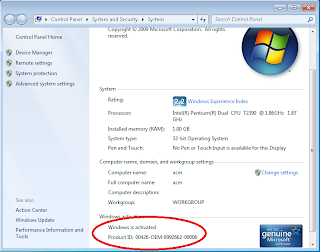
9. Untuk melihat berhasil atau tidaknya " klik kanan pada icon My Computer akan kelihatan seperti dibawah ini atau paling gampang adalah tidak muncul lagi tulisan Windows Note Genuine di pojok kanan bawah layar desktop.

tampilan windows7 setelah activated


Download
Read More

Rabu, 01 Februari 2012

IDM 6.07 With Serial Key

| |
0 komentar
Internet Download Manager (IDM) is a tool to increase download speeds by up to 5 times, resume and schedule downloads. Comprehensive error recovery and resume capability will restart broken or interrupted downloads due to lost connections, network problems, computer shutdowns, or unexpected power outages

idm full versi

Simple graphic user interface makes IDM user friendly and easy to use.Internet Download Manager has a smart download logic accelerator that features intelligent dynamic file segmentation and safe multipart downloading technology to accelerate your downloads. Unlike other download managers and accelerators Internet Download Manager segments downloaded files dynamically during download process and reuses available connections without additional connect and login stages to achieve best acceleration performance.


Download IDM 6.07 Final Build 14.rar

Read More

Selasa, 20 Desember 2011

WinUSB Maker 1.8 - The Windows Setup to USB Solution

| |
0 komentar
WinUSB Maker, is a tools to make dynamically any Removable Device as bootable with Windows Setup. to  installers system operating windows.


WinUSB Maker
 Features:
  • Full faster drive backup / restore, including the MBR, the user can make an full backup of the USB Drive including the MBR Boot Sector, and all stored files
  • Totally coded with maximum security, to avoid any error, With the Protection Platform, never is allowed the format of current Windows Drive
  • Can work with Setup DVD / Setup Folder / Setup ISO Image
  • Always format in NTFS System, make the device boot sector as same of HDD
  • Force dismount for all devices, forcing the format if the device is in use
  • Can make a DOS / GRLDR automated Bootable USB Disk
  • Fastest file copy, maximum process priority level
  • Identify compatible setup folders
  • Support devices larger than 1TB
  • Capture only removable devices
  • Refresh all devices in one click
  • Auto-explain the functions if the cursor is drawn
  • Check the Folder and Device size, for better compatibility
  • Dynamic Progress Bar and specific File / Folder / Status shown for works
  • BIOS / EFI of the computer always recognize the USB Bootable as HDD, needed only make the boot for it
  • DOS Bootable disk always formatted in FAT32
  • Drive restore will format with NTFS Filesystem, without remove all partitions
Compatibity:
  • Windows 8
  • Windows 7
  • Windows Vista
  • Windows Server 2008 / 2011 Family
  • Embedded and Others based in Windows Vista / 7 / 8
 All versions / editions, including x64 systems
 PE / Live CD's Bootable Disks of this versions are supported
 Norton Ghost Live CD / Others based in 6.x Windows setup modules are supported

Link Download :
http://www.filesonic.com/file/4292295354/WinUSB.Maker.rar
Read More

Sabtu, 17 Desember 2011

DivX Plus Pro v8.2.1

| |
0 komentar
DivX Plus Pro – is a completely new set of codecs (DivX, H.264, AAC and MKV). The structure also includes the DivX H.264 Decoder for hardware acceleration using the DXVA (DirectX Video Acceleration) – this makes it possible to watch video in high definition, almost without fear of excessive CPU usage. When using more complex and demanding methods of compression is obtained compressed file with better quality but requires less CPU – concern shifted to the video chip, and even low-power system (eg, netbook) can easily reproduce it.

DivX Plus Pro v8.2.1>
Developers call the new version of a significant head start. The point here is the new DivX Plus, which is based on MKV and is completely free. As a basis for the format DivX Plus HD is selected MKV. Now the component DivX Converter can convert video to DivX Plus HD (output file MKV/H.264) completely free. It is worth noting that the usual DivX to output file DivX/MPEG-4 ASP remains, of course, continue to pay and has a 15 day evaluation period.

Also worth noting improved DivX Player with the function of DivX To Go for quick and easy transfer of video on the device with a label DivX Certified. In addition to free features, the package includes a few paid, who worked for free for 15 days. All paid features are needed for converting to DivX and DivX HD (not DivX Plus).

DivX Plus Codec Pack:
• Play high-quality videos with DivX Codec
• Watch DivX, AVI, MKV and MP4 videos in popular media players
• Stream MKV videos to your game console (using Windows 7)
DivX Plus Converter:
• Convert your videos to DivX or MKV in one step
• Create high definition MKV videos for free
• Backup personal DVDs with the additional MPEG-2/DVD Plug-in
DivX Plus Player:
• Play DivX, AVI, MKV, MP4 and MOV videos
• Transfer videos to your devices with DivX To Go
• Navigate your videos with greater speed and precision.
Home Page -http://www.divx.com/

http://www.filesonic.com/file/4264430794/DivX.Plus.Pro.v8.2.1.Incl.Keygen-Lz0_3ArabArchive.Net_Appz_Blog.zip
Read More

Minggu, 04 Desember 2011

Download Themes Cantik Untuk WindowsXP

| |
0 komentar
backgound windows-xp

Percantik windows Xp kamu dengan Themes themes cantik ini.
Files berisi 60 themes cantik yang terdiri dari :

1 media cente 2010
2 vortex red
3 windows 7 good
4 windows 7
5 xtreme xp green
6 xtreme xp blue
7 aero ruby
8 MO4
9 outsiders
10 red cliff
11 royal girl
12 sentinel green
13 sentinel orange
14 windows live blue
15windows live pink
16 vista ultimate
17 vista vg blue
18 vista orange
19 vista green
20 vista pink
21 girl amber
22 girl biohazard
23 girl dzart chi bi
24 girl neo volet
25 girl pal
26 girl zxbiyao
27 kung fu panda
28 kungfu hip hop
29 luu diec phi
30 naruto
31 war craft
32 wall e
33 eve
34 dzblo
35 spider man 3
36 dzart jay 1
37 dzart jay 2
38 u know
39 x cruizer
40 boom online
41 R2Beat
42 cronex
43 s4
44 onyx 2
45 molee 1
46 molee 2
47 metal
48 green box
49 forever winter
50 bnw
51 IBalXP2
52 blue nano
53 azenis 2
54 dragon stile
55 lor
56 DzMX
57 misfit
58 peony
59 ubuntu
60 media center 2005

Link download :
http://www.filesonic.com/file/3966253014/60_Pack_Themes.rar
Read More

Jumat, 02 Desember 2011

Webcam Motion Detector

| |
0 komentar
Motion detection and webcam monitoring. Video surveillance with multiple IP cameras and video capture devices. For each video frame, if motion is detected, the Alarm event occurs, that returns a global motion ratio, depending of the number of cells in which motion has been detected, and the level of motion in each cell.


A sensitivity grid is applied on video frames. You can adjust the sensitivity of the detection, and mask out areas of the camera view to avoid false alarms. When the camera captures video frames in a dark environment, it is possible that the electrical background noise of the CCD video cell creates fake motion detection events. It is possible to reduce the sensitivity of to the video noise by enabling the Reduce Video Noise option.
When an alarm condition is detected, the program can sound an audible alarm, or send you an email with a photo. Automatically capture photos, or record video in compressed files. Webcam Motion Detector includes an advanced player that allows to play video clips, capture video frames and perform frame overlay. Each camera has its own individual monitoring and recording settings. All settings, such as alerts, photos, and video recordings can be turned on and off using the built-in scheduler.

OS : Win XP/2000/Vista/Win 7
Language : English

Home Page - http://www.zebra-media.com/webcammotiondetector.html
http://www.filesonic.com/file/4059865664/WebcamMotionDetector.rar
Read More

GetFLV Pro 9.0.6.7 Multilingual

| |
0 komentar
GetFLV is a totally integrated suite of powerful utilities to download, manage, convert, repair and play FLV video files (Flash video). FLV Downloader: A powerful tool to download FLV from all video sharing sites with the technologies of automatic URL-parsing. FLV to Video Converter: Convert FLV files to popular video formats. It lets you convert FLV to AVI, MPEG, MP4, 3GP, MOV, WMV and etc.


FLV Audio Ripper: Extract FLV Audio to popular audio format. It lets you convert FLV to MP3, WMA, WAV, AAC and etc. Video to FLV Converter: A professional conversion tool to convert video to FLV. It supports almost all types of video formats such as MPEG, AVI, WMV, MOV, ASF, MP4, 3GP and etc. FLV Fixer: Repair the FLV video files that can't be seeked. More FLV utilities will be added.

GetFLV
- Download and manage FLV video files
- Convert FLV files to popular video formats
- Extract FLV Audio to popular audio formats
- Convert popular video to FLV
- Repair FLV video that can't be seeked
- More FLV utilities will be added in future
- The complete FLV utility package.

Full service for your FLV video files
- GetFLV is a totally integrated suite of powerful utilities to download, manage, convert, repair and play FLV video files (Flash video).
- FLV Downloader: A powerful tool to download FLV from all video sharing sites with the technologies of automatic URL-parsing.
- FLV to Video Converter: Convert FLV files to popular video formats. It lets you convert FLV to AVI, MPEG, MP4, 3GP, MOV, WMV and etc.
- FLV Audio Ripper: Extract FLV Audio to popular audio format. It lets you convert FLV to MP3, WMA, WAV, AAC and etc.
- Video to FLV Converter: A professional conversion tool to convert video to FLV. It supports almost all types of video formats such as MPEG, AVI, WMV, MOV, ASF, MP4, 3GP and etc.
- FLV Fixer: Repair the FLV video files that can't be seeked.
- More FLV utilities will be added.

OS : Win XP/2000/Vista/Win 7
Language : Multilingual

Home Page - http://www.getflv.net
Link download :
http://www.filesonic.com/file/4059428494/GetFLV_Pro_9.0.6.7.rar
Read More

Ncesoft Flip Book Maker Download

| |
0 komentar
Ncesoft Flip Book Maker software is the most easiest to use and powerful flipping book software, allows you to convert PDF to magazine, PDF to flipbook, present your digital magazine, flash magazine, digital newspapers, electronic magazines, digital catalogs, christmas magazines, wedding magazine, company catalog. Enhance your customers, readers impressed by your remarkable digital magazine.


20+ Flipping Book templates, including Christmas magazine templates, wedding magazine templates and more...
Convert PDF to FlipBook, create digital magazine, flash page flip book
More room for setting the style of your flipping book
Publish as SWF, HTML, EXE, Screensaver
Unlimit projects, unlimit pages

Features

Make real effect digital page flipbook
Support importing images, swf, video (flv), pdf format
Support exporting swf, html, exe, screen saver, e-mail
Add background music to flipbook
Add dynamic background to flipbook
Add scene effect to flipbook
Add title for book
Change the size of flipbook
Change control button style
Change background style
Change book paper style
Setting half page and full page
Support landscape flip book, landscape page flip
Automatic page flipping
Flash book slideshow mode
Zoom In/Zoom Out pages
20+ templates include Christamas magazine templates, Valentine's Day templates, wedding magazine templates and more.
Export single file
Support Internal Link & External Link in PDF
Download option
Support transparent background
Create all files for burn CD
More features are expected your exploration you can free download Ncesoft Flip Book Maker

Home Page: http://www.ncesoft.com/flip-book-maker.html
http://www.filesonic.com/file/4068185984/Ncesoft.Flip.Book.Maker.2.8.1.rar
Read More

Download Foxit PDF Reader 5.0

| |
0 komentar
The Best PDF Reader - Over 100 Million Users Whether you're a consumer, business, government agency, or educational organization, you need to read and annotate PDF documents and fill out PDF forms.
foxit pdf reader 5.0

You need your PDF Reader to be:

* Fast - so you're not waiting forever to read files.
* Lightweight - so it's easily deployable and doesn't exhaust system resources.
* Secure - so you don't get infected with viruses and can keep sensitive information safe.
* A Platform - so you can extend the Reader by creating your own value added capabilities for internal use or for resale.

The Foxit Reader is a small, fast, and feature rich PDF viewer which allows you to open, view, and print any PDF file. Unlike other free PDF readers, Foxit Reader also includes easy to use collaboration features like the ability to add annotations, fill out forms, and add text to PDF documents. Foxit Reader has a small footprint that starts up instantly, renders PDF files quickly and uses very little memory, which is especially important with today's handheld devices. The Foxit Reader is packed full of convenient and easy to use viewing, editing and printing features that make document collaboration simple. Foxit Reader's secure platform insures worry free operation against malicious virus and provides a secure and reliable digital signature verification platform for exchanging electronics documents without putting the user at risk from falsified documents.

New Features:

1.Supports XFA form filling.
2.Supports to open the RMS protected PDFs with Foxit Reader.
3.Supports to customize shortcut keys for various commands.
4.Supports to reload the opened PDF document that is modified by other PDF tools.
5.The new Split View mode allows you to divide the PDFs into two panes or four panes.
6.Fit Visible mode enables the PDF pages to fit the width of the window.
7.Supports Tabbed Toolbar Mode.
8.Supports 11 different page transition types in the full screen mode.
9.Offers four nice skins for appearance change.
10.Supports to search keywords in the comment and bookmark.
11.Enables you to preview a PDF attachment in Microsoft Outlook.
12.Displays the PDF files in the Windows Explorer as the thumbnails if Foxit Reader has been set as the default PDF viewer.
13.Adds more available command lines.
Bug Fixes:
Fixed an unexpected termination of Foxit Reader when opening some affected PDF files.

Link download :
http://www.filesonic.com/file/4068095364/FoxitReader.510.rar
Read More

Kamis, 24 November 2011

IP Sniffer 1.99.3.0

| |
0 komentar
IP Sniffer is a suite of IP Tools built around a packet sniffer.The packet sniffer can work on all Windows versions using either: the new raw socket implementation of Windows (driverless), WinPcap (needs to be installed), a NDIS protocol (needs to be installed , no reboot). IP sniffer is a protocol analyzer, that will use the XP/2K Raw Socket features.


IP Sniffer is also a suite of IP Tools like: IP trafic monitor, IP statistics, ARP (list & deleter entries, send request), Netbios Names, Route Print, Netstat (shows process attached to a connection, kill attached process, kill tcp entry), Network informations (Params, Adapters, Cards), Spoofing (TCP, UDP, ICMP, ARP), WINS Query, DNS Query (using win32 DNSAPI), DHCP Find, WHOIS, Resolve IP / Hostname, PING (Host & Subnet), TCP Scan (Host & Subnet)

• The IP tools are :
· Bandwidth monitor. view
· Adapter statistics (IP & NDIS). view
· Wireless Stumbler.
· List and manage ARP entries, resolve IP to MAC, resolve MAC to IP, send a WAKEUP call. view
· List and manage routes, enable & disable host as a router. view
· List and manage open ports and attached processes. view view
· Edit network config.
· Hook winsock (winsock32.dll & ws2_32.dll).
· Spoof ARP (and do ARP cache poisoning), spoof TCP, spoof UDP, spoof ICMP, spoof DHCP Release.
· Change MAC address, discover remote mac addresses. view
· SNMP Get & Set, List interfaces, Switch port mapper, Media Attachment Unit table.
· WINS Query.
· DNS (advanced) Query, DNS Server, Local resolver.
· DHCP Server (with PXE support), DHCP Discover.
· Whois Query.
· SMTP client.
· TCP tools (TCP ping, TCP half scan, Time-Daytime client/server).
· UDP tools (MSSQL Ping, SNMP ping, SSDP scan, Syslog client/server, Time-Daytime client/server, server).
· ICMP tools.
· TCP/UDP bounce port.
· MS Networks :
Enum servers by type, Spoof net send, Shutdown remote windows, Display remote windows properties, Display remote netbios names, Enum Terminal Services processes and sessions, Enum remote print ports, Enum remote drivers, Enum remote AT jobs, Enum remote scheduled tasks.
· Password tools :
Edit protected storage (IE, Outlook Express, ...) , Decrypt Dialup Passwords , Dump XP Credentials ( MSN, network shares, ...) & decrypt passwords , Decode IE history, Reveal asterisks / hidden passwords, decode RDP, Decode MSAccess passwords, enum WEP keys.
· List and manage local & remote processes.
· Tiny firewall (using Windows API).
· Get internet IP.

Home Page - http://erwan.l.free.fr/
Link download :
Read More

Selasa, 22 November 2011

NVIDIA Quadro Drivers 276.14

| |
0 komentar
NVIDIA has released a set of WHQL drivers supporting the Quadro FX, NVS and Blade / Embedded Graphics Board series desktop GPUs for Windows XP/2k, Windows Vista and Windows 7.


New in Release 276.14:
Display
Revised the ‘Adjust Desktop Size and Position,’ page to provide improved controls for desktop scaling and resizing.

1. Includes a preview window.
2. Available for all displays (including VGA and HDMI connections).
3. Scaling override option

Workstation
Under Windows Vista/Windows 7, the Set up SLI Mosaic page uses the same controls as the Set up Mosaic page.

Display Support
Added 10-bit Grayscale through DVI for Windows 7  - enables 10-bit Grayscale through DVI for supported monitors such as proprietary medical displays.

G-Sync
Enable Direct3D applications to synchronize back buffer presents across multiple GPU's in one system or multiple systems. Multi-Window and Full-Screen applications are supported. Requires NVIDIA G-Sync II and supported Quadro boards, see http://www.nvidia.co.uk/page/quadrofx_gsync.html for more information.

ODE Driver
The R275 drivers are the first ‘Optimal Drivers for Enterprise’, a release dedicated to relatively long term stability for ISV certification, OEMs, and Enterprise customers.

New APIs
OpenGL path rendering API – enables high-quality text and 2D rendering with OpenGL applications.

NVIDIA WMI
This driver release includes NVIDIA WMI, a Windows service as well as decouple WMI provider that allows WMI clients to query and monitor such GPU parameters as GPU fan speed and GPU temperature.

Workstation application compatibility fixes. Please read the release notes for more information on product support, feature limitations, driver fixes and known compatibility issues.

Existing Support:
  • Support for the Open Computing Language (OpenCL) 1.0 in Quadro FX Series x700 and newer as well as the FX4600 and FX5600.
  • Support for CUDA 4.0
  • Support for OpenGL 4.1
  • Support for Directx11

Link download for windows-xp drivers :
http://www.nvidia.co.uk/content/DriverDownload-March2009/confirmation.php?url=/Windows/Quadro_Certified/276.14/276.14-quadro-tesla-winxp-32bit-international-whql.exe&lang=uk&type=Quadro

Link download for Windows Vista / Windows 7
http://www.nvidia.co.uk/content/DriverDownload-March2009/confirmation.php?url=/Windows/Quadro_Certified/276.14/276.14-quadro-tesla-win7-winvista-32bit-international-whql.exe&lang=uk&type=Quadro
Read More

News Intel Rapid Storage Technology 10.8

| |
0 komentar
This Intel Raid driver supports RAID 5 & 10 on specific desktop platforms; supports RAID 0, 1, AHCI & Matrix RAID on specific desktop and mobile platforms. This release is for any flavor of Windows XP, Vista and 7 32 or 64 bit.


The driver should be installed after the operating system has been installed.  F6 and RAID BIOS configurations need to be performed prior to installation of this driver for proper operation.

Intel RAID Technology requires the Intel ICH9R/ICH9M-E/ICH10R/PCH-PCH-M SATA RAID controller hub, Intel 82801HR I/O controller hub (ICH8R), Intel 631xESB/632xESB I/O controller hub, Intel 82801GR/GH I/O controller hub (ICH7R/DH), Intel 82801FR I/O controller hub (ICH6R).
This driver provides support for the following:

High-capacity & fault-tolerant SATA RAID 5 arrays and high-performance & fault-tolerant SATA RAID 10 arrays on select Intel 5 Series, 4 Series, 3 Series, 965, 975X, 955X and 945 chipset-based platforms.

High-performance SATA RAID 0 arrays & redundant SATA RAID 1 arrays on select Intel 5 Series, 4 Series, 3 Series, 965, 975X, 955X, 945, 925, 915 chipset-based platforms.

AHCI support on select Intel 5 Series, 4 Series, 3 Series, 965, 975X, 955X, 945, 925 and 915 chipset-based platforms, as well as on Mobile Intel 915/910 chipset-based platforms.

Link Download here :

http://downloadcenter.intel.com/confirm.aspx?httpDown=http://downloadmirror.intel.com/20624/a08/iata_cd_10.8.0.1003.exe&lang=eng&Dwnldid=20624
Read More

Kamis, 17 November 2011

Virus Ramnit Begini Cara Membersihkannya

| |
0 komentar
Windows kamu kok rasanya lambat banget loadingnya sepertinya berat banget bisa jadi terinfeksi Virus Ramnit, virus ramnit memiliki ciri ciri  jika pc desktop, netbook atau notebook anda terinfeksi Ramnit virus :

  • Ada file dengan nama file “Copy of Shortcut to (1).lnk” s/d “Copy of Shortcut to (4).lnk” dan folder RECYCLER di  Flashdisk
  • Komputer  menunjukkan informasi “Virtual Memory Minimum Too Low” sementara komputer tidak menjalankan banyak aplikasi
  • Pada beberapa komputer Icon Removable media (USB Flash) berubah menjadi icon Folder
  • Pada beberapa komputer User tidak dapat m engakses USB Flash  dengan menampilkan pesan ”Access is denied”
  • Virus ini  menginjeksi file yang mempunyai ekstensi EXE, dll dan HTM/HTML
  • komputer menjadi lambat banget dan memakan kapasias hdd seolah olah penuh.

Yang unik dari virus Ramnit ini antara lain adalah jika komputer diinstal ulang maka virus ini akan muncul lagi karena semua hasil infeksi dari virus ini merupakan induk virus.  Virus Ramnit setelah berhasil menginfeksi flashdisk, dalam penularannya  akan langsung membuat folder bernama C:\Program Files\Microsoft dan C:\Program Files\Common Files\Microsoft  dikomputer korbannya, lalu membuat backup file didalam Folder System Volume Information dan Recycle pada setiap Harddrive, menginfeksi  data berekstensi EXE, dll dan HTM/HTML sehingga jika kita menginstal ulang komputer maka backup virus yang ada di System Volume Information dan Recycle setiap Harddrive akan kembali menginfeksi dan membuat file watermark.exe didalam :\Program Files\Microsoft dan C:\Program Files\Common Files\Microsoft… Setelah W32/Ramnit berhasil menginfeksi komputer ia juga akan mengifeksi file [C:\Windows\Explorer.exe dan C:\Windows\System32\Winlogon] kemudian memanggil file induk lainnya yang ditugaskan untuk aktif di memori, memanggil aplikasi [C:\Program files\Internet Explorer\Iexplore.exe].

Mapping virus ramnit nya begini :

===================================================================================================================
    * Operating system: Windows Xp English
    * Profile Name: UserName
    * Windows directory: C:\WINDOWS

[%APPDATA%] - C:\Documents and Settings\UserName\Application Data\
[%COMMON_APPDATA%] - C:\Documents and Settings\All Users\Application Data\
[%COMMON_DESKTOPDIRECTORY%] - C:\Documents and Settings\All Users\Desktop\
[%COMMON_DOCUMENTS%] - C:\Documents and Settings\All Users\Documents\
[%COMMON_FAVORITES%] - C:\Documents and Settings\All Users\Favorites\
[%COMMON_PROGRAMS%] - C:\Documents and Settings\All Users\Start Menu\Programs\
[%COMMON_STARTMENU%] - C:\Documents and Settings\All Users\Start Menu\
[%COMMON_STARTUP%] - C:\Documents and Settings\All Users\Start Menu\Programs\Startup\
[%COOKIES%] - C:\Documents and Settings\UserName\Cookies\
[%DESKTOPDIRECTORY%] - C:\Documents and Settings\UserName\Desktop\
[%FAVORITES%] - C:\Documents and Settings\UserName\Favorites\
[%FONTS%] - C:\WINDOWS\Fonts\
[%INTERNET_CACHE%] - C:\Documents and Settings\UserName\Local Settings\Temporary Internet Files\
%LOCAL_APPDATA%] - C:\Documents and Settings\UserName\Local Settings\Application Data\
[%MYMUSIC%] - C:\Documents and Settings\UserName\My Documents\My Music\
[%MYPICTURES%] - C:\Documents and Settings\UserName\My Documents\My Pictures\
[%MYVIDEO%] - C:\Documents and Settings\UserName\My Documents\My Videos\
[%NETHOOD%] - C:\Documents and Settings\UserName\NetHood\
[%PERSONAL%] - C:\Documents and Settings\UserName\My Documents\
[%PRINTHOOD%] - C:\Documents and Settings\UserName\PrintHood\
[%PROFILE%] - C:\Documents and Settings\UserName\
[%PROFILE_TEMP%] - C:\Documents and Settings\UserName\Local Settings\Temp
[%PROFILEPATH%] - C:\Documents and Settings\UserName\
[%PROGRAM_FILES%] - C:\Program Files\
[%PROGRAM_FILES_COMMON%] - C:\Program Files\Common Files\
[%PROGRAMFILES%] - C:\Program Files\
[%PROGRAMS%] - C:\Documents and Settings\UserName\Start Menu\Programs\
[%RECENT%] - C:\Documents and Settings\UserName\Recent\
[%RESOURCES%] - C:\WINDOWS\resources\
[%SENDTO%] - C:\Documents and Settings\UserName\SendTo\
[%STARTMENU%] - C:\Documents and Settings\UserName\Start Menu\
[%STARTUP%] - C:\Documents and Settings\UserName\Start Menu\Programs\Startup\
[%SYSTEM%] - C:\WINDOWS\system32\
[%USER_RECYCLING_BIN%] - c:\Recycler\S-*
[%WINDOWS%] - C:\WINDOWS\

=======================================================================================================================

Berikut cara manual mengjapus virus ramnit :

- Hapus Watermark.exe :

1.   Matikan system restore (klik kanan my computer pilih properti), cabut kabel lan atau koneksi internet
2.   Buka Task Manager (Ctrl+Alt+Del)
3.   Pada Tab Process cari svchost.exe yang usernamenya bukan LOCAL SERVICE, SYSTEM atau NETWORK SERVICE. melainkan nama komputer (biasanya terdapat 2 process, klik End Process.
4.   Buka START pilih RUN (Win+R) ketik cmd tekan enter
5.   Ketik: CD\  enter, atau pada c:\ Prompt atau  terlihat “C:\>” saja.
6.   Ketik: cd program files/microsoft tekan enter
7.   Ketik: del WaterMark.exe /a /s tekan enter
8.   Ketik: md watermark.exe tekan enter.
9.   Ketik: cd watermark.exe tekan enter
10. Ketik: md con\\tekan enter lalu Restart windows
11. Setelah masuk windows buka START – RUN (Win+R) ketik: regedit tekan enter
12. Buka di [HKEY_LOCAL_MACHINE\SOFTWARE\Microsoft\Windows NT\CurrentVersion\Winlogon], cari Userinit Klik 2 kali Userinit. lihat value Data nya c:\windows\system32\userinit.exe, c:\program files\microsoft\WaterMark.exe ganti dengan “c:\windows\system32\userinit.exe”

Proses diatas tujuannya adalah dengan melalui mode DOS menghapus file watermark.exe  menjadi folder watermark.exe sehingga kita dapat memutuskan eksekusi proses virus tersebut.

Selanjutnya untuk pembersihan virus, restart komputer dan scan komputer dengan antivirus. Ada baiknya uninstal dulu antivirus terdahulu karena ada kemungkinan telah terinfeksi, lalu instal lagi antivirus yang terbaru (terupdate). beberapa yang pernah saya coba adalah menggunakan avira, kaspersky, Norman malware cleaner atau boleh juga dengan smadav terbaru.

Pengalaman lain penghapusan virus ini untuk komputer yang telah benar-benar parah adalah :

Jika anda memutuskan untuk melakukan instal ulang karena file-file berekstensi EXE telah banyak terinfeksi apalagi jika yang tertular kebanyakan adalah drivers computer, maka dari pada menginstal ulang driver-driver  tersebut untuk menghemat waktu baiknya instal ulang saja… nah, agar setelah komputer selesai instal ulang dan tidak kembali tertular maka sebelum instal ulang lakukan dulu beberapa hal dibawah :

1. Download dulu PCMAV Express for Ramnitkiller di link ini :
    http://www.ziddu.com/download17398920/RamnitKiller.exe.html
2. Matikan system restore, putuskan sementara koneksi internet
3. Restart komputer dan masuk ke safe mode (F8)
4. Colok flashdisk dan jalankan RamnitKiller dari PCMAV yang sudah anda download tadi, tools tersebut adalah program portable sehingga tidak perlu diinstal, tunggu proses pembersihan sampai benar-benar selesai… (jika kurang yakin ulangi sekali lagi karena proses pembersihan sudah tergolong cepat)
5. Silakan instal ulang windows anda tetapi jangan langsung menginstal driver
6. Restart komputer dan masuk safe mode lagi, colok flashdisk dan jalankan RamnitKiller sekali lagi.
7. kalau sudah silahkan restart komputer, baru instalkan driver.
8. selesai.

Beberapa referensi lain, adalah dengan cara:
  • Dengan cara menggunakan Dr Web Live CD yang baru (proses scaningnya agak lama)
  • Dengan cara mencabut hardisk yang terinfeksi virus ramnit kemudian menggandengnya dengan komputer yang bersih (tentunya autorunnya dimatikan dulu) lalu scan menggunakan Bitdefender Internet Security 2010
  • Dengan cara menggunakan Malware Script VB Dropper Remover (harus sudah terinstal program Java)
  • Dengan cara menggunakan CHANET SPLITTER II (hanya untuk menghentikan process ramnit dan memperbaiki file HTM/HTML yang di injeksi oleh Ramnit)
  • Dengan cara menggunakan Norman Ramnit Cleaner atau Norman Malware Cleaner
  • Sesudahnya sangat disarankan untuk instal security patch Windows (MS10-046 KB2286198)
Semoga bermanfaat.

Update  Link Dowbload :  http://adf.ly/7xIz3
Read More

Kode DAn Tombol Rahasia Untuk Mengembalikan Windows Asli Tiap Netbook

| |
0 komentar
Netbook tiba-tiba mengalami error operating system alias tidak bisa masuk Windows? ada cara mudah dan bisa dkerjakan sendiri bagaimana mengembalikan windows asli netbook atau windows default dari netbook. terkadang di tiap netbook sudah ada backup OS aslinya jika suatu saat OS rusak anda bisa memperbaikinya sendiri tanpa menginstall ulang Sistem Operasi Windows netbook kamu..dan tiap netbook memiliki kode perintah  untuk merestore kembali Windows pada posisi defaultnya karena kebanyakan netbook tidak dilengkapi CD?DVD Rom.


Berikut kode rahasia dari tiap merek netbook untuk memperbaiki / recovery windows yang rusak :

1. Pihak Acer untuk mengatasi kerusakan tersebut adalah menginstall ulang atau merestore Windows XP original yang ada pada netbook tersebut dengan cara berikut ini:

Anda dapat menekan tombol Alt + F10 saat booting proses, yakni sesaat setelah logo acer muncul pada layar laptop anda hingga sebelum keluar notifikasi booting windows error.

Atau Anda dapat menggunakan aplikasi Acer eRecovery Management pada laptop anda dengan menekan menu di bawah ini, jika Anda dapat log in pada OS windows XP di laptop anda tersebut. Start >> All Programs >> Empowering Technology >> Acer eRecovery Management

Dengan kedua cara di atas Anda tidak perlu susah-susah menginstall Windows XP

2. Untuk Toshiba mengembalikan windows yang tertanam di hardisk pada laptop or netbook silahkan ikuti langkah-langkah berikut :

    * Shutdown atau matikan laptop atau komputer.
    * Pastikan charger terpasang karena proses recovery bisa jadi berlangsung lama
    * Tekan angka 0 (nol) lalu nyalakan komputer dengan menekan tombol power, lepaskan setelah muncul pemberitahuan recovery muncul dilayar
    * Setelah permberitahuan recovery muncul, ikuti instruksi yang diberikan oleh Toshiba, karena setiap type berbeda instruksi lalu tunggu sampai selesai proses recovery

3. Untuk Asus Menggunakan Tombol F9 Partisi pemulihan memberikan solusi pemulihan komprehensif yang cepat mengembalikan perangkat lunak Anda Eee PC ke kondisi semula bekerja

Untuk menggunakan partisi pemulihan, cadangan file data Anda ke USB atau drive lain dan membuat catatan dari setiap pengaturan disesuaikan seperti pengaturan jaringan.

Nonaktifkan Booster Boot. Booster booting item dalam BIOS setup membantu eee pc untuk boot lebih cepat. Penguat boot harus dinonaktifkan sebelum menggunakan pemulihan sistem. Mulai eeepc dan tekan F2 pada bootup kunci untuk menampilkan layar posting. Sekali lagi tekan tombol F2 untuk masuk setup Bios. Nonaktifkan Booster Boot yang tersedia dalam tab "Boot". Tekan F10 untuk menyimpan konfigurasi dan restart Eee PC 900HA.

    * Tekan tombol F9 saat bootup (memerlukan Partisi Recovery)
    * Klik tombol tanda centang untuk memulai pemulihan sistem.
    * Sistem ini dimulai pemulihan sistem secara otomatis dan ikuti petunjuk pada layar untuk menyelesaikan proses pemulihan.

Ini akan memakan waktu hanya 10 menit sampai 20 menit untuk mengembalikan Windows XP. File dan Data pada Drive C: akan hilang selama mengembalikan. Jadi mengambil cadangan dari file penting Anda sebelum melakukan pemulihan.

4. Untuk HP

    * Nyalakan komputer.
    * Ketika layar biru awal HP muncul Tekan "F10" tombol.
    * Sebuah menu akan muncul Pemulihan.
    * Klik "NEXT" dan kemudian klik pada "YA"
    * Sistem Anda sekarang akan pergi melalui pemulihan produk

Read More
Diberdayakan oleh Blogger.